Among the leading scanners is the TRIOS 5 from 3Shape a cutting-edge intraoral scanner that streamlines the orthodontic workflow from digital impression to Invisalign submission. This comprehensive guide explains everything you need to know about TRIOS 5, how it works within the Invisalign workflow, its benefits, and why it is an essential tool for modern orthodontic practices in 2026.
What Is TRIOS 5?
TRIOS 5 is the latest generation of intraoral scanners developed by 3Shape. Intraoral scanners capture highly accurate digital impressions of a patient’s mouth replacing traditional physical molds (alginate or PVS) with precise 3D models.
Key innovations in TRIOS 5 include:
- High-speed scanning technology
- Enhanced color visualization
- Improved soft-tissue and margin detection
- Wireless and ergonomic design
- Advanced workflow integration with orthodontic applications
In essence, TRIOS 5 digitizes the entire capture process making clinical tasks faster, more comfortable for patients, and more accurate for clinicians.
Understanding the Invisalign Workflow
Invisalign is a popular clear aligner system that gradually moves teeth using a series of custom-designed transparent trays. For effective aligner treatment planning, accurate 3D models of the patient’s dental structures are crucial.
The digital orthodontic workflow with TRIOS 5 typically includes the following steps:
- Patient Scanning
- Data Optimization
- Invisalign Case Submission
- Treatment Planning
- Aligner Fabrication
- Patient Monitoring
TRIOS 5 plays a central role in the first three steps, ensuring that the data sent to Invisalign is reliable and ready for advanced planning.
How TRIOS 5 Works in the Invisalign Submission Workflow
1. Intraoral Scanning
The process begins with intraoral scanning using the TRIOS 5 device:
- The scanner captures detailed 3D images of the teeth, gums, and occlusion.
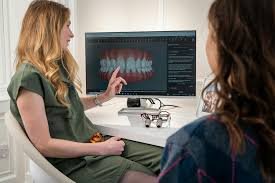
- The digital impression is visualized in real time.
- The clinician can immediately verify scan completeness and accuracy.
Instant feedback reduces the risk of rescan appointments and increases clinical efficiency.
2. Data Processing and Optimization
After scanning:
- Automatic alignment and stitching of 3D data occur.
- Soft tissue and margin detection are enhanced using AI-assisted software.
- The clinician can identify and refine any areas requiring adjustment.
Here, the digital model becomes the foundation for Invisalign treatment planning.
3. Submission to Invisalign
Once the scan is complete and optimized:
- The digital file is exported in the required format (usually .STL or .PLY).
- The clinician uploads the scan to the Invisalign Doctor Site or communicates directly through integrated software solutions.
- Invisalign specialists use this data to build the ClinCheck treatment plan.
The accuracy of TRIOS 5 scans ensures better clinical predictability and often reduces treatment refinements later on.
Key Features of TRIOS 5 for Invisalign Users
High-Resolution 3D Capture
Detailed scans empower precise treatment planning, improving aligner fit and outcomes.
Color Visualization
Captures realistic tooth and soft-tissue color data, enhancing documentation and communication with patients.
Wireless & Lightweight Design
Improves ergonomics and patient comfort during the scanning process.
AI-Driven Margin Detection
Automatically identifies critical anatomical landmarks, reducing manual adjustments.
Seamless Case Export
TRIOS 5 integrates smoothly with Invisalign submission portals, minimizing file conversion issues.
Patient Education Tools
Visual guides help clinicians explain treatment plans and progress, improving patient acceptance and engagement.
Benefits of a Digital Orthodontic Workflow
The combination of TRIOS 5 and Invisalign transforms the patient experience and clinical outcomes in several ways:
1. Improved Accuracy
Digital scans eliminate common errors associated with traditional impressions.
2. Enhanced Patient Comfort
Scanning is faster and far more comfortable than conventional impressions.
3. Time Efficiency
Fewer rescan appointments save both clinician and patient time.
4. Better Clinical Predictability
High-quality data leads to more accurate Invisalign treatment plans.
5. Enhanced Communication
Digital records improve collaboration between clinicians, labs, and patients.
6. Reduced Material Waste
Eliminating physical molds is more sustainable and cost-efficient.
Common Challenges and Solutions
Challenge: Learning Curve
Clinicians new to digital workflows may require training.
Solution:
3Shape and many professional education groups offer structured training, webinars, and hands-on workshops to support adoption.
Challenge: Initial Cost
Investing in TRIOS 5 represents a significant upfront expense.
Solution:
The long-term savings from increased efficiency, reduced remakes, and improved case acceptance can offset initial costs. Many practices also offer financing or leasing options.
Future Scope of TRIOS 5 and Invisalign Integration (2026)
Looking ahead, several trends continue to shape the digital orthodontic landscape:
AI-Enhanced Treatment Prediction
Greater reliance on machine learning to optimize treatment planning and outcome forecasting.
Cloud-Connected Workflows
Instant case sharing across devices and clinical teams.
Remote Monitoring Integration
Patients may use mobile scanning tools or guided apps synced with TRIOS 5 data for ongoing progress updates.
Personalized Aligners
Advanced manufacturing techniques could enable even more customized aligner materials based on patient-specific biomechanics.
Enhanced Tele-Orthodontics
Virtual consultations and follow-ups using TRIOS 5 3D models help reach patients remotely.
Practical Tips for Clinicians Using TRIOS 5 for Invisalign
Ensure Proper Scanning Technique
Hold the scanner steadily and work slowly across occlusal, buccal, and lingual surfaces for complete capture.
Optimize Software Settings
Use automatic features like margin detection to enhance workflow speed.
Review Scans Carefully
Confirm that all surfaces are captured before exporting this reduces case revisions.
Communicate With Patients
Use 3D visuals to show patients what their scans reveal and explain treatment steps clearly.
Keep Software Updated
Regular updates may include improved scanning algorithms and submission features.
Conclusion
In 2026, the combination of TRIOS 5 and Invisalign submission represents one of the most efficient, accurate, and patient-friendly orthodontic workflows available. By replacing traditional impressions with high-fidelity digital scans, clinicians gain speed, clarity, and predictability while patients benefit from comfort and improved outcomes.